hue
An interactive syntax-highlighting file viewer and live theme previewer over sparkles:syntax. It reads a source file, highlights it with the precise tree-sitter pipeline, and renders it in one of four modes: non-interactive ANSI, HTML, an interactive terminal previewer, and an optional raylib GUI window with a render-markdown.nvim-style markdown preview.
dub run :hue -- path/to/file.d          # highlight in the terminal
dub run :hue -- --html file.d > out.html
dub run :hue -- --gui file.md           # raylib window + markdown preview
The full, traceable feature inventory lives in the hue feature spec. Known issues and deferred implementation work are tracked in its open issues.
Twoslash overlay
hue --twoslash <nodes.json> renders a TypeScript Twoslash node model as a type-annotation overlay on the highlighted code — hovers, ^? queries, ^| completions, errors, highlights, and custom @tags — in HTML (the Shiki .twoslash-* contract, 100% CSS :hover, no JS), ANSI (terminal twoslash — the differentiator), and the raylib GUI. Hover/query docs and @tag values render as Markdown; a browser copy of the code yields only the code (annotations are non-selectable). See the twoslash spec for the requirements and the library docs for the API.
Interactive showcase
Every example fixture, rendered by hue --twoslash --html and served exactly as the overlay emits it — hover the dotted-underline tokens for the type popups, and use prev/next to browse:
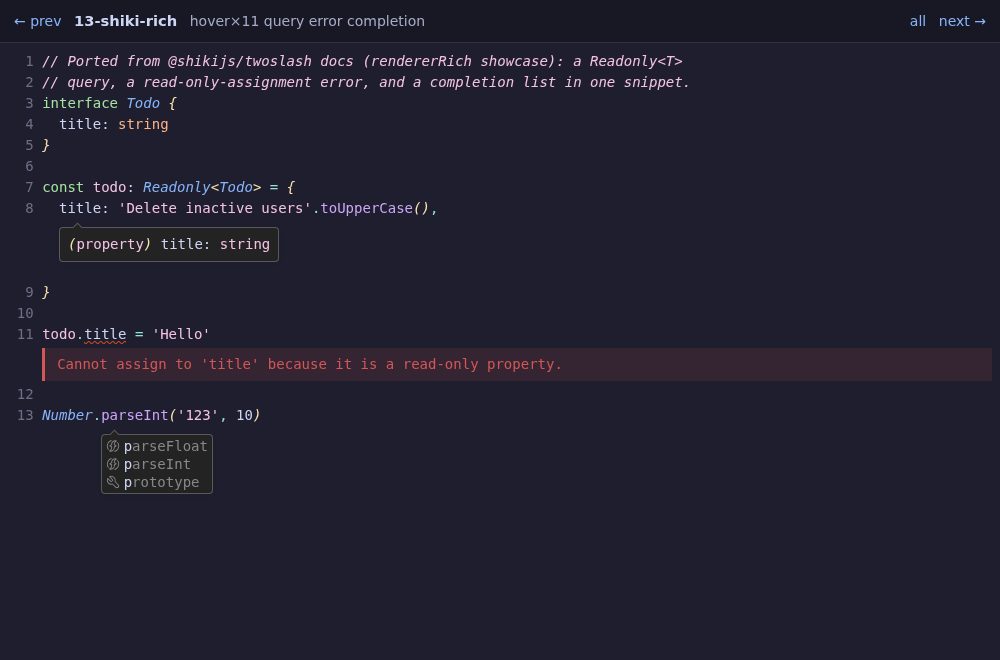
The gallery is generated at docs-build time from the committed libs/twoslash/examples/fixtures/*.twoslash.json by hue itself (hue <fixtures> --twoslash --html --out), so it always matches the shipped overlay — and you can render the same gallery for any directory locally.